
In Part 3 we covered client management and sanctions screening. Now for the part that makes most people nervous: reporting to AUSTRAC.
If you suspect money laundering, terrorism financing, or other suspicious activity, you're legally required to file a Suspicious Matter Report (SMR). If a client makes a cash transaction of $10,000 or more, you must file a Threshold Transaction Report (TTR). Getting these wrong — or missing them — carries serious penalties.
AML Mate's reporting module turns these from stressful, ambiguous obligations into guided, step-by-step forms.
The Reports Dashboard
Your reports hub shows everything at a glance:
- Total SMRs and TTRs filed to date
- Overdue reports flagged with red badges — these need immediate attention
- Registration status — whether your AUSTRAC enrolment is tracked
- Quick links to create new reports or view existing ones
Think of it as your reporting control centre. If something needs filing, you'll see it here.
Suspicious Matter Reports (SMR)
When to File
You must file an SMR when you form a suspicion that a client or transaction may relate to:
- Money laundering
- Terrorism financing
- Tax evasion or fraud
- Proceeds of crime
- Any other indictable offence
The key word is suspicion — you don't need proof. If something doesn't feel right, you should report it.
Deadline: 24 hours from when the suspicion is formed for terrorism financing matters, 3 business days for all other suspicious matters. AML Mate tracks this deadline with colour-coded indicators — green (plenty of time), yellow (approaching), red (overdue).
The 5-Step SMR Wizard
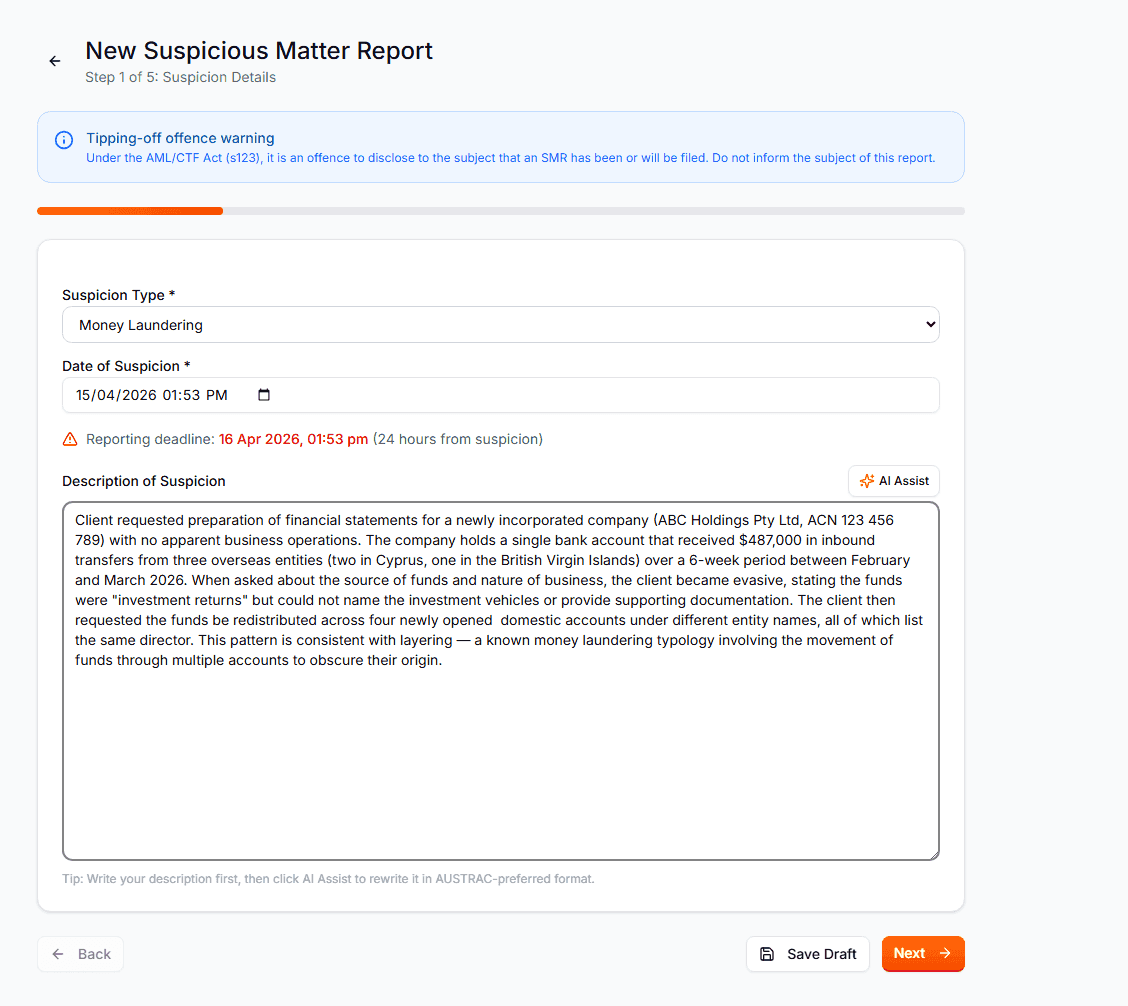
AML Mate breaks the SMR into five clear steps:
Step 1 — Suspicion Details What type of suspicious activity are you reporting? Select from categories (money laundering, terrorism financing, fraud, etc.), describe the suspicion, and record the exact date it was formed. This date starts your reporting deadline clock.
Step 2 — Transaction Information If the suspicion relates to a specific transaction: date, amount, currency, transaction type, and a description of what happened. Not every SMR involves a transaction — you can skip this if the suspicion is based on behaviour or circumstances.
Step 3 — Subject Details Who are you reporting about? Enter their name, date of birth, address, identification details, nationality, and occupation. If the subject is already a client in AML Mate, you can link them directly — their details auto-populate from their client record.
Step 4 — AUSTRAC Indicators This is where AML Mate really helps. AUSTRAC publishes lists of suspicious activity indicators for each industry — specific red flags that suggest money laundering or terrorism financing.
AML Mate presents these indicators organised by your industry:
- Accountants: unusual trust structures, inconsistent source of funds, reluctance to provide documentation
- Legal: unusually complex transactions, client with no clear business purpose, large cash settlements
- Real Estate: property purchases significantly above market value, rapid buy-sell cycles, use of shell companies
- Jewellers: large cash purchases just under reporting thresholds, reluctance to provide ID, unusual shipping requests
Select the indicators that match what you've observed. This strengthens your report and shows AUSTRAC you've applied their guidance. The same indicators are available as a reference in the Risk Indicators section of the reports module — organised across four industry tabs with examples and recommended actions.
Step 5 — Review & Submit Before you submit, AML Mate runs a pre-validation check: are all required fields complete? Is the description detailed enough? Does the timeline make sense?
There's also an AI review button — it analyses your report against AUSTRAC's typology guidance and flags anything that might need more detail or clarification. Think of it as a second pair of eyes before you lodge.
After Submission
Reports move through a clear status workflow:
Draft → Ready to Lodge → Lodged with AUSTRAC
You can save drafts and come back to them. When ready, mark as "Ready to Lodge" for internal review. Once actually submitted to AUSTRAC (through their portal), update the status to "Lodged."
Need to file a similar report? The Copy function duplicates an existing SMR as a template — useful when you see the same pattern across multiple clients.
Threshold Transaction Reports (TTR)
TTRs are more straightforward than SMRs. Any cash transaction of $10,000 or more (or foreign currency equivalent) must be reported to AUSTRAC within 10 business days.
The TTR Form
The form captures:
- Transaction details: date, amount, currency, type (cash in, cash out, or foreign currency exchange), and description
- Structuring flag: a checkbox to indicate if the transaction appears to have been deliberately split to avoid the $10,000 threshold — this is a criminal offence and should be flagged
- Customer details: name, DOB, address, ID type and number, occupation — or link to an existing client
Like SMRs, there's an AI description assistant that generates a clear, compliant transaction description based on the details you've entered.
Pre-Validation and AI Review
Before submission, the same validation and AI review process applies. The system checks for completeness and flags potential issues.
Bulk Export to Excel
Need to reconcile your TTR records or share them with your compliance officer? Select multiple TTRs from the list and export them to Excel in one click. The export includes all transaction details, client information, and filing dates.
Annual Compliance Report
At the end of each reporting period, you need to demonstrate your compliance activity. AML Mate's Annual Report feature auto-aggregates:
- All SMRs and TTRs filed during the period
- Registration status and updates
- Summary statistics
Generate a report for any of the last 5 years. Start as a draft, review the aggregated data, then finalise. Download the finished report as part of your compliance records.
Tipping Off: What You Must NOT Do
One critical legal requirement: you must not tell the client (or anyone else) that you've filed an SMR about them. This is called "tipping off" and it's a criminal offence.
AML Mate keeps your reporting activity completely separate from your client-facing records. The client's detail page shows their risk level and CDD status, but never reveals whether an SMR has been filed. Your reports are visible only to users with appropriate access.
What This Replaces
Without a structured system, reporting typically involves:
- Trying to remember AUSTRAC's deadline rules
- Writing reports in Word documents with inconsistent formatting
- No tracking of which reports are overdue
- No systematic way to apply AUSTRAC's indicators
- Manual record keeping with no audit trail
AML Mate gives you guided forms, deadline tracking, AI assistance, pre-validation, and a complete filing history. When AUSTRAC asks about your reporting procedures, you can demonstrate a systematic, documented process.
This is Part 4 of our "Inside AML Mate" series. Catch up on Part 1: Business setup, Part 2: Program editor, and Part 3: Client management.
Coming up next:
- Part 5: Staff training and the audit-ready export pack
Ready to simplify your AUSTRAC reporting? Start your 14-day free trial, cancel anytime. Or run a free compliance check, no signup needed, to see where you stand.