
In Part 1, we showed you what happens in the first 5 minutes after signing up — business setup, risk assessment, and your compliance dashboard.
Now for the part everyone asks about: what does the actual AML/CTF Program look like?
AUSTRAC requires every reporting entity to have a written program covering six parts (A through F). Most people stare at the 200-page AUSTRAC guidance and freeze. So let's open the editor and show you exactly what you're working with.
The Six Parts at a Glance
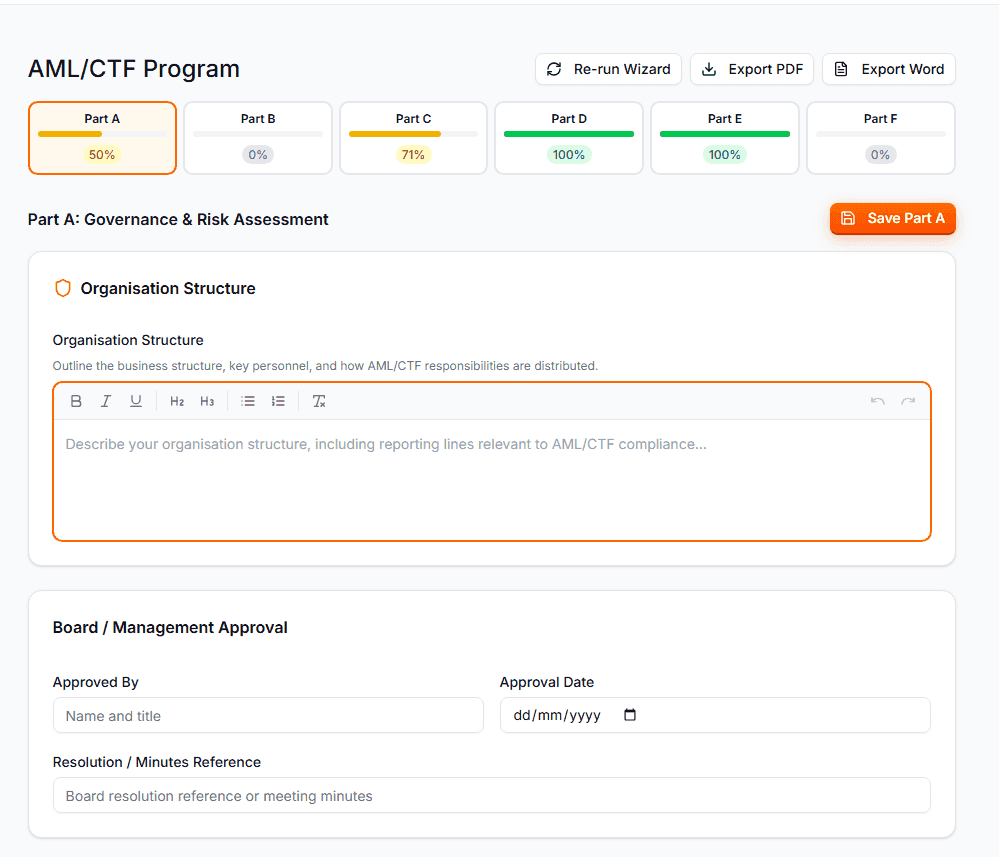
When you open the program editor, you'll see six tabs across the top — one for each part of your AML/CTF program:
| Part | Title | What It Covers |
|---|---|---|
| A | Governance & Risk | Your compliance officer, board approval, risk methodology, risk factor analysis |
| B | Personnel & Training | Staff roles, training program, delivery methods, refresh schedule |
| C | Customer Due Diligence | CDD procedures, verification methods, EDD triggers, PEP/sanctions screening |
| D | Transaction Monitoring | What you monitor, thresholds, red flags, escalation procedures |
| E | Reporting Obligations | SMR and TTR procedures, tipping-off rules, reporting timelines |
| F | Record Keeping & Review | 7-year retention, storage methods, annual review process, version control |
Each tab shows a progress bar — colour-coded from red (empty) through yellow (partial) to green (complete). You can see at a glance which parts need work and which are done.
Pre-Filled with Industry-Specific Content
Here's where AML Mate saves you serious time.
Remember the industry you selected during onboarding? That selection drives everything. When you open Parts D and E for the first time, they're already populated with AUSTRAC's official guidance for your industry.
If you're an accountant, you'll see transaction monitoring procedures written for accounting practices — covering trust account movements, unusual billing patterns, and client fund flows. If you're a jeweller, you'll see content about cash transactions over $10,000, structuring red flags, and bullion purchase monitoring.
This isn't generic template text. It's drawn from AUSTRAC's industry starter kits and tailored to the designated services you selected.
Part A pulls in your compliance officer details and risk assessment from onboarding — already done.
Part B auto-populates your training statistics if your team has completed any modules.
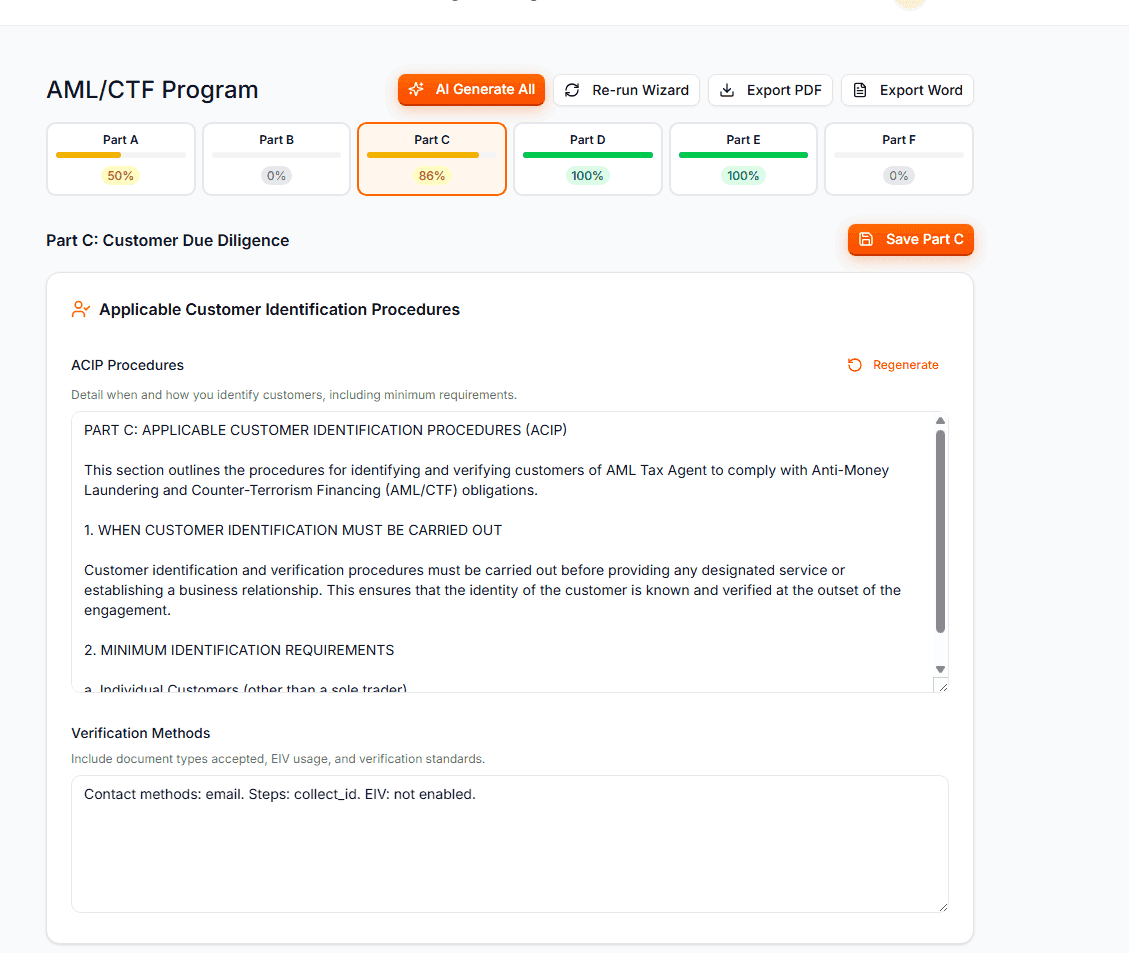
Part C inserts the CDD procedures and EDD triggers based on your risk profile.
You're not starting from a blank page. You're editing a draft that's already 60–70% complete.
The AI Generate Button
Every section in the editor has a Generate button (the sparkles icon). Click it, and AML Mate's AI writes a compliance-ready draft for that specific field.
This isn't ChatGPT guessing at compliance language. The AI knows:
- Your business name, industry, and state
- Your designated services and risk level
- Your employee count and business structure
- AUSTRAC's published guidance for your sector
It generates 300–600 words of substantive content — the kind of language a compliance consultant would write, with references to AUSTRAC requirements.
Once a section holds text, you get two buttons in place of one:
- Tidy up my notes rewrites what you typed as a finished section. Write how your firm does things in your own words, and it turns that into program language. It adds nothing you did not write, shows you the result before anything is replaced, and lists the points you have not covered yet.
- Replace with AI draft removes what is there and writes a new standard draft. It asks you to confirm first, because your current text is lost.
Hover over either button to see what it does.
Generate All: One Click, Entire Program
Don't want to click field by field? The "AI Generate All" button at the top scans your entire program for empty or minimal fields and fills them all in sequence.
You'll see a progress banner — "Generating: Risk Methodology (3 of 27 fields)" — streaming each section in real time. You can cancel at any point if you want to take over manually.
After generation completes, each part auto-saves. The whole process takes about 2–3 minutes for all six parts.
The result: a 30+ page AML/CTF program, customised to your business, generated in minutes.
Is it perfect? No — you should read through and adjust anything specific to your practice. But it's a solid, compliant foundation that would take a consultant days to produce.
Edit Everything
Every field is a text editor. Change anything you want. The AI gives you a starting point; you make it yours.
Some things you'll want to customise:
- Part A: Add specific details about your board structure or management approval process
- Part B: Tailor the training schedule to your team's actual availability
- Part C: Add any client-specific verification procedures unique to your practice
- Part D: Adjust monitoring thresholds to match your transaction volumes
- Part E: Include internal escalation contacts and phone numbers
- Part F: Specify your actual document storage system (cloud provider, physical location)
The editor saves per-part, so you can work on one section at a time without losing progress elsewhere.
Export: PDF or Word
When your program is ready, hit Export.
You get two options:
PDF — a professionally formatted document with:
- Cover page (business name, ABN, date prepared)
- Table of contents
- All six parts with structured headings and sections
- Ready to submit to AUSTRAC or hand to an auditor
Word (DOCX) — the same content in an editable format:
- Orange-branded headings matching AML Mate's design
- Page breaks between parts
- Fully editable in Microsoft Word or Google Docs
- Perfect for internal review or adding handwritten annotations
The exported program is typically 30–40 pages — a comprehensive, professional document that demonstrates genuine compliance effort. This is exactly what AUSTRAC expects to see.
What This Replaces
Without AML Mate, here's what building an AML/CTF program looks like:
- Download AUSTRAC's 200-page guidance PDF
- Find the relevant sections for your industry (good luck)
- Open a blank Word document
- Write 30+ pages of compliance procedures from scratch
- Hope you haven't missed anything
- Pay a consultant $5,000–$10,000 to review it
With AML Mate:
- Open the program editor (already pre-filled)
- Click "Generate All" for remaining sections
- Review and customise
- Export to PDF or Word
- Done
The program editor is where AML Mate delivers the most value. It turns a weeks-long project into an afternoon's work.
This is Part 2 of our "Inside AML Mate" series. Catch up on Part 1: Setting up your business and risk assessment.
Coming up next:
- Part 3: Client management — adding customers, running CDD, and automatic sanctions screening
- Part 4: Reporting — how to file SMRs and TTRs
- Part 5: Staff training and audit-ready exports
Ready to build your program? Start your 14-day free trial, cancel anytime. Or run a free compliance check, no signup needed, to see what your obligations are.