
In Part 1 we set up your business. In Part 2 we built your AML/CTF program. Now let's talk about the people your program is designed to protect against risk — your clients.
Customer Due Diligence (CDD) is the core of any AML/CTF program. AUSTRAC expects you to know who your customers are, verify their identity, assess their risk, and screen them against sanctions lists. AML Mate handles all of this in one place.
Adding Clients
You can add clients three ways:
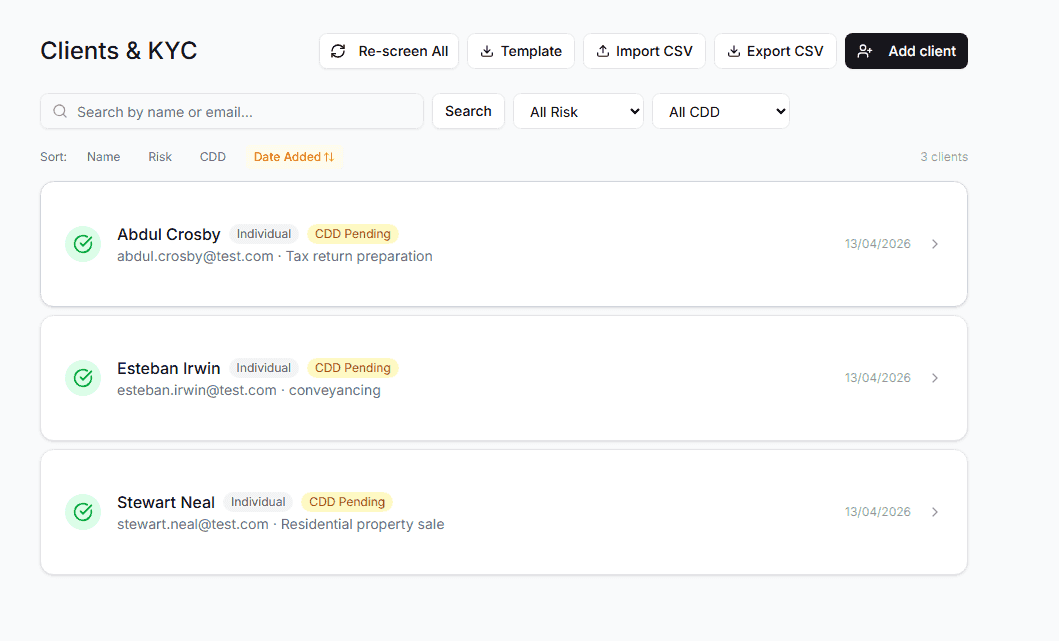
Manual entry — click "Add Client" and fill in the basics: name, type (individual, company, or trust), email, date of birth, nationality, and address. Select the service type you're providing them.
CSV import — have an existing client list? Upload a CSV file and AML Mate maps your columns to the right fields. It deduplicates against existing clients so you don't get doubles. A template CSV is available if you want to format your data first.
KYC link — generate a shareable link and send it to your client. They fill in their own details and upload ID documents directly. No back-and-forth emails, no chasing PDFs.
Once a client is in the system, their detail page becomes the single source of truth for everything compliance-related about that person or entity.
The Client Detail Page
Each client gets a dedicated page with several cards, each handling a specific compliance requirement:
Client Information
The basics — name, email, date of birth, nationality, address, client type. All editable. This is your Know Your Customer (KYC) foundation.
Risk Assessment
Every client gets a risk rating: low, medium, or high. The rating considers factors like:
- Are they a Politically Exposed Person (PEP)?
- Are they from a FATF high-risk jurisdiction?
- What type of services are you providing them?
- Do they have complex ownership structures?
You can manually flag a client as a PEP, or let the screening do it automatically. There's also an AI risk assessment button that analyses all available information and provides a detailed risk narrative.
Identity Verification (CDD)
This card tracks whether you've verified the client's identity. Record the document type (passport, driver's licence, Medicare card) and document number, then mark CDD as complete.
For higher-risk clients or those flagged as PEPs, you may need Enhanced Due Diligence (EDD) — the system flags this automatically when screening results warrant it.
Electronic Identity Verification (EIV)
For businesses that need third-party verification, AML Mate integrates with Stripe Identity for electronic identity verification. The client completes a biometric check (photo ID + selfie) through a guided flow, and the result feeds back into their client record.
This is optional — not every business needs EIV — but it's there when you do.
Documents
Upload and store client documents directly on their profile: identity documents, proof of address, proof of funds, source of wealth declarations. Everything in one place, audit-ready, with 7-year retention built in.
PEP, Sanctions & Media Screening
This is the card that does the heavy lifting.
When you add a new client, AML Mate automatically screens them against two databases in parallel:
DFAT Consolidated Sanctions List — the Australian government's official list of sanctioned individuals and entities. AML Mate downloads and caches this list daily, running fuzzy name matching with normalisation to catch spelling variations and transliterations.
OpenSanctions — a global PEP and sanctions database covering politically exposed persons across jurisdictions. Results come back with a match confidence score, filtered by nationality and date of birth when available.
Screening Results
After screening, each client gets a clear status:
| Status | What It Means |
|---|---|
| Clear | No matches found on any list |
| Potential Match | A possible match needs manual review (confidence score 70–85%) |
| Match | Confirmed hit on DFAT or OpenSanctions |
| Error | Screening couldn't complete — retry available |
If a match is found, several things happen automatically:
- The client's risk level is reassessed
- An urgent alert is generated and appears on your dashboard
- If the match is a PEP, the CDD status shifts to require Enhanced Due Diligence
- Everything is logged in the audit trail
You can re-screen any client manually at any time. The system also tracks when the next screening is due — automatically set to 12 months from the last screen.
Recording your review
When a client shows a Match or Potential Match, open Review on the client's screening card or from Alerts. Compare what you hold with the listed entry, choose what you concluded and write why. AML Mate keeps that record, includes it in your audit pack, and won't raise a match you clear as a false positive again unless the listed entry's details change.
Bulk Screening
Don't want to screen clients one by one? The Bulk Screen button on the client list page runs every client through both databases in a single operation. When it finishes, you get a summary: how many were screened, how many matches were found, and which clients need attention.
This is particularly useful for existing businesses onboarding their client base for the first time before the July 2026 deadline.
What CDD Looks Like Day-to-Day
Here's the practical workflow most businesses will follow:
- New client engagement — add them to AML Mate (or send a KYC link)
- Automatic screening — DFAT + OpenSanctions runs immediately
- Verify identity — record their ID document details, upload copies
- Assess risk — review the auto-generated risk rating, adjust if needed
- Ongoing monitoring — re-screen annually, update documents, log any changes
The client list page lets you filter by risk level and CDD status, so you can quickly see who needs attention. Search by name or email to find specific clients. Sort by risk level to prioritise your highest-risk relationships.
What This Replaces
Without a system like AML Mate, CDD typically means:
- A spreadsheet of client names with manual notes
- Checking the DFAT website by hand (and hoping you spell the name right)
- Filing documents in folders on a shared drive
- No systematic re-screening schedule
- No audit trail of when you checked what
AML Mate turns this into a structured, auditable process. Every screen, every document upload, every risk assessment is logged with timestamps. When AUSTRAC asks "show us your CDD records," you have a complete, searchable history.
This is Part 3 of our "Inside AML Mate" series. Catch up on Part 1: Setting up your business and Part 2: The AML/CTF Program editor.
Coming up next:
- Part 4: Reporting — filing Suspicious Matter Reports and Threshold Transaction Reports
- Part 5: Staff training and audit-ready exports
Ready to manage your clients compliantly? Start your 14-day free trial, cancel anytime. Or run a free compliance check to see what your obligations are.